Browse modes
Browse Series and Browse Sets.
 Scott's TCG Binder
Sets is the catalog browser. Each set shows its logo, series, year, offline artwork progress, and a completion count. Opening a set shows ownership against that set's checklist.
shot desktop-sets · seq 7 · screen sets
Visual reference not yet available for this platform.
Visual reference not yet available for this platform.
Browse Series and Browse Sets.
Filter Series, Filter Year, and Clear Filters. Sort Year, Sort Descending is the visible sort label.
Completion, owned value, All / Owned / Missing, Core / Full / Master, Missing Cards, Set Checklist, and Stop Tracking Set.
Use Browse Series or Browse Sets, search by set name, and filter by series or year. A set page shows completion, owned and missing filters, and the cards in that set.
shot desktop-sets · seq 7 · screen sets
Visual reference not yet available for this platform.
Visual reference not yet available for this platform.

Set browser on Browse Sets.
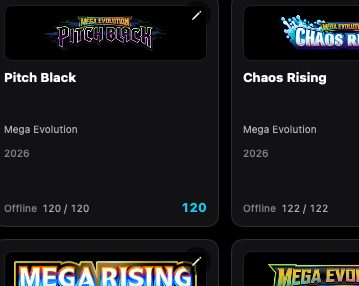
Set browser on Browse Sets.
Desktop is the captured platform. iPhone and iPad stay on this feature so later screenshots attach without a second catalog.
shot desktop-sets · seq 7 · screen sets
Visual reference not yet available for this platform.
Visual reference not yet available for this platform.
Operational steps, controls, and the annotated screen.