Coverage
The status line reports priced and missing counts for the collection and the catalog, plus failed and unavailable counts.
 Scott's TCG Binder
Pricing turns the collection into a value table. Filter to priced or missing cards, then refresh the gaps or open a price build.
macOS
shot desktop-pricing · seq 19 · assets/screenshots/original/desktop/0019.png
iPhone
shot iphone-pricing · seq 125 · assets/screenshots/original/iphone/pricing.png
Visual reference not yet available for this platform.
The status line reports priced and missing counts for the collection and the catalog, plus failed and unavailable counts.
Preferred currency, market, automatic refresh, and optional eBay and PriceCharting credentials live in Settings → Pricing.
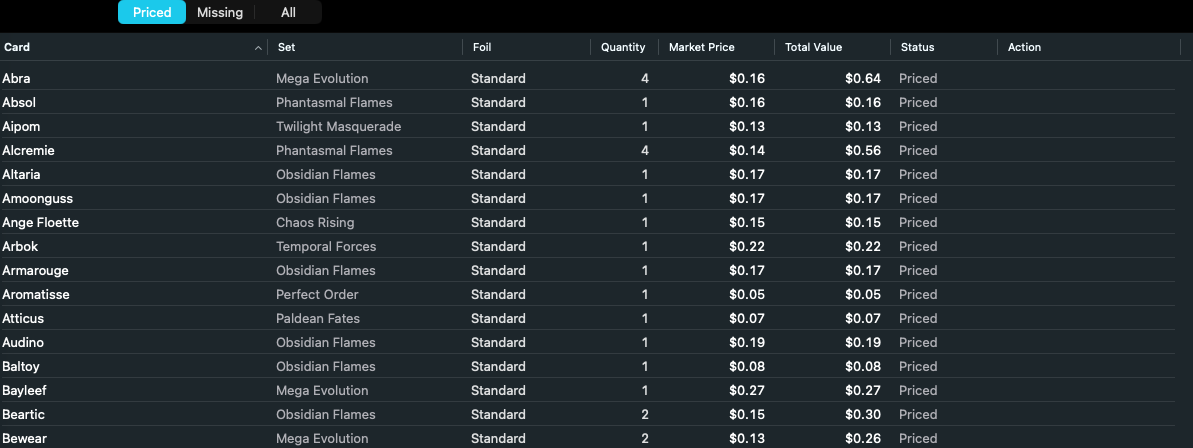
Search cards, then filter Status, Set, Series, and Foil. Priced, Missing, and All switch the table. Columns are Card, Set, Foil, Quantity, Market Price, Total Value, Status, and Action. Refresh Missing Prices and Price Build are in the header. The capture shows a catalog value and a last-updated time.
macOS
shot desktop-pricing · seq 19 · assets/screenshots/original/desktop/0019.png
iPhone
shot iphone-pricing · seq 125 · assets/screenshots/original/iphone/pricing.png
Visual reference not yet available for this platform.

Pricing table for priced cards.
Pricing table for priced cards.
Priced, Missing, and All stay a segmented control. The list replaces the wide table.
iPad uses the iPhone analytics menus and Scan tab, with more room in landscape. No iPad screenshots are in this library yet.
Operational steps, controls, and the annotated screen.