Import rule
The visible rule increases quantity when the existing card is compatible.
 Scott's TCG Binder
Import & Export is the file door. Bring a collection in, send JSON or CSV out, or export a trade list, sale list, or wishlist.
shot desktop-import-export · seq 20 · screen import-export
Visual reference not yet available for this platform.
Visual reference not yet available for this platform.
The visible rule increases quantity when the existing card is compatible.
Trade, sale, and wishlist are separate exports. There is no separate trade-workbench screen in this capture.
Import Collection uses Choose File. When this card already exists offers Increase Quantity When Compatible in the capture. Export Collection offers Export JSON and Export CSV. Export Shareable Lists offers Share Trade List, Share Sale List, and Export Wishlist.
shot desktop-import-export · seq 20 · screen import-export
Visual reference not yet available for this platform.
Visual reference not yet available for this platform.
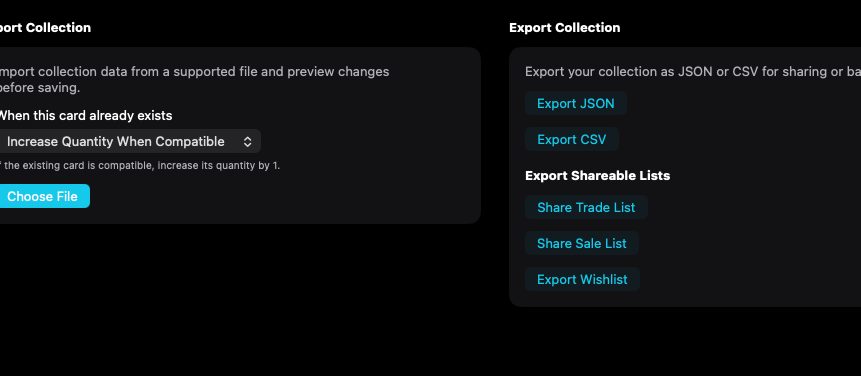
Import and export actions with no file chosen.
Desktop is the captured platform. iPhone and iPad stay on this feature so later screenshots attach without a second catalog.
shot desktop-import-export · seq 20 · screen import-export
Visual reference not yet available for this platform.
Visual reference not yet available for this platform.
Operational steps, controls, and the annotated screen.